Meaning Memory Explained: How Agents Share Memory Across the Enterprise
Run more than one agent and memory becomes a boundary question. Here is how scope groups in Meaning Memory keep some memories private, share others with a team, and enforce the line in the data model, not the prompt.
By Clinton Stark • explainer, multi-agent, scopes, series
Fresh off our beta launch earlier this week, I want to dig into one of the features we think will matter most for large AI agent fleets: shared memory.
In Meaning Memory, every agent already carries a memory system modeled on how human memory works: significance, decay, consolidation. (More on that in a future post.) But as agents go from novelty to norm, there is tremendous value in grouping them so related agents can share what matters: a sales pod that sees the same account intelligence, an ops team that inherits the same runbooks, a strategy group whose guidance reaches the right people and no one else.
That last part, sharing with the right agents and no one else, is what makes this tricky. Run one agent and memory is simple: it remembers, you move on. Run two and you hit a question nobody warns you about: what should they share?
The two easy answers are both wrong. Give each agent its own silo and they can never build on each other’s work. Pool everything into one shared memory and an account manager’s private hunch about a nervous CFO lands in the support bot’s context. Real teams do not work either way. They work in scopes: some things are private, some belong to a team, a few are known to everyone.
That is how memory is scoped in Meaning Memory. Every memory is private by default. Sharing is something an agent does on purpose, into a named scope. And the boundary is enforced by the engine, not by asking a model nicely to keep a secret.
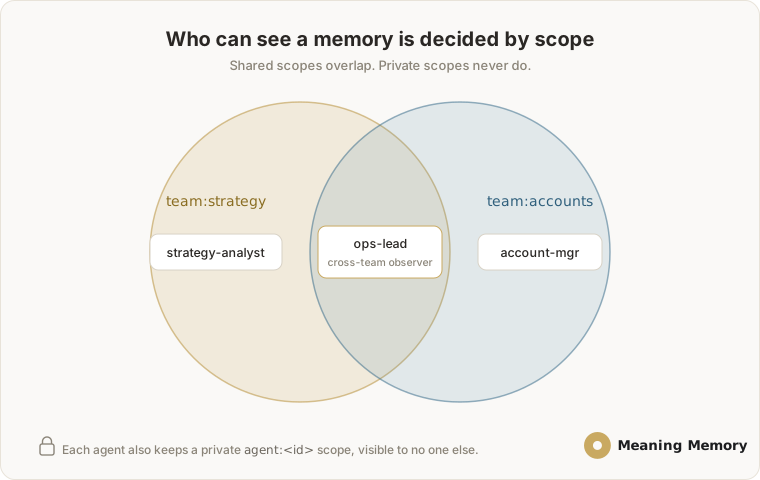 Three agents, two shared team scopes, and a cross-team observer: the fleet we configure below.
Configure the fleet
You describe each agent’s access in one file. Here is a three-agent tenant: a strategy analyst, an account manager, and an ops lead who watches both teams.
# authcontext.yaml
version: 1
tenants:
  acme:
    agents:
      strategy-analyst:
        allowed_scope_groups: [team:strategy, agent:strategy-analyst]
      account-mgr:
        allowed_scope_groups: [team:accounts, agent:account-mgr]
      ops-lead:                                   # cross-team observer
        allowed_scope_groups: [team:strategy, team:accounts, agent:ops-lead]
    groups:
      team:strategy: { backfill_policy: all_history }
      team:accounts: { backfill_policy: all_history }
      agent:strategy-analyst: { backfill_policy: forward_only }   # private
      agent:account-mgr:      { backfill_policy: forward_only }
      agent:ops-lead:         { backfill_policy: forward_only }
allowed_scope_groups is the whole authorization surface: it governs what an agent can read and what it can write into. Each agent also gets a private scope of its own, agent:<id>. The ops lead sits in both team scopes, so it sees everything either team shares without anyone having to CC it.
Sharing is one field
A memory’s audience is decided by its scope_groups. Leave it off and the memory stays private to the agent that wrote it. Add a scope and any agent allowed into that scope picks it up on its next memory compile, the step that assembles each agent’s working memory.
# private by default: only the writing agent ever sees this
mm_remember(text="Pricing call felt shaky; follow up before the QBR.")

# shared with the strategy team
mm_remember(text="Q3 priority is APAC expansion, ~$4-6M ARR.",
            scope_groups=["team:strategy"])

# shared with two teams at once: any overlap wins
mm_remember(text="AcmeCorp renewal at risk; needs exec attention.",
            scope_groups=["team:accounts", "team:strategy"])
The calling agent’s identity comes from its authenticated session, so it is not passed as an argument.
Who sees what
Those three memories, across the fleet above:
| Memory | Scope | strategy-analyst | account-mgr | ops-lead |
|---|---|---|---|---|
| Pricing call felt shaky… | (private) | — | ✓ | — |
| Q3 priority: APAC expansion | team:strategy | ✓ | — | ✓ |
| Renewal at risk | team:accounts, team:strategy | ✓ | ✓ | ✓ |
The private hunch stays with one agent. The strategy note reaches its team and the cross-team observer. The at-risk renewal, tagged to both teams, reaches everyone. Same engine, three different blast radii, and not one prompt that says “please do not share this.”
Two rules keep it honest
- Private by default. An empty scope is writer-only. Sharing is always a positive act, never an accident.
- The tenant wall is absolute. Scopes operate inside a single tenant. AcmeCorp’s
team:strategyis never visible to another tenant, by the data model, not by policy. No agent can query across that boundary.
Scope names follow a prefix:slug convention, where the prefix is one of role, org, team, project, or agent. The agent: prefix is reserved for an agent’s own private scope.
Why we built it this way
Information boundaries should not live in a system prompt that a model can forget or be talked out of. In Meaning Memory they are structural: a scope a memory lives in, a scope an agent is allowed into, and a hard tenant wall around all of it. An agent cannot retrieve what it was never given a scope for, because the query never returns it. Concretely: before the model is invoked, the engine runs an indexed query that returns only memories whose scopes overlap the agent’s allowed scopes, inside its own tenant. Anything outside that set is never fetched, so there is nothing for the model to leak. It is the same mechanism that keeps a customer-facing support agent from ever reaching an internal team:billing scope, even when a prompt tries to make it.
That is the difference between asking an agent to be discreet and running a system that simply cannot leak.
From three agents to three hundred
This example uses three agents and two teams because it fits on one screen. The model does not change as you grow. The same prefix:slug scopes span org:, project:, team:, and role: boundaries, so a fleet of hundreds of agents maps onto the structure your organization already has: a project: scope per engagement, a role: scope per function, an org: scope for company-wide context, and a private agent: scope for every agent. Tenants stay hard-walled from each other throughout. You are not wiring up hundreds of point-to-point relationships; you declare which scopes each agent belongs to, and the engine resolves visibility from there.
Scoped sharing is opt-in. Leave a memory untagged and it stays private; tag it to share. It is one piece of Meaning Memory, alongside significance scoring, optional decay curves you can tune or switch off, and the STARE 5D model behind what each agent encodes and retrieves. Together they add a memory layer to the agent stack you already run. Meaning Memory plugs into OpenClaw, Hermes, Cursor, Claude, and other common tools through its MCP server and SDK.
Want to see it run? The customer kit ships a three-agent quickstart that proves scope isolation in a few steps. Request access or email [email protected].
Part of the Meaning Memory Explained series.